

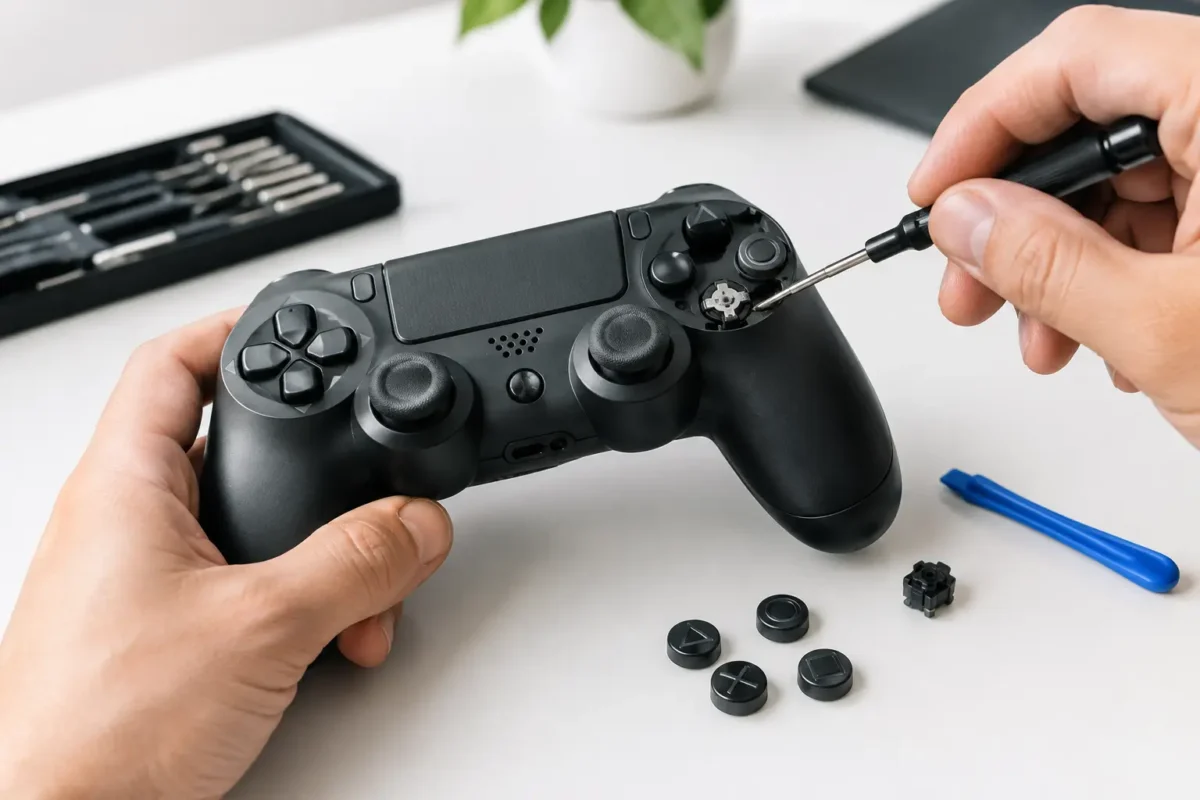
A controller button can look perfectly normal and still fail at the worst possible moment: the jump does not register, the menu button activates twice, or a single sticky face button turns a working gamepad into a liability. Knowing how to fix broken controller buttons starts with identifying the kind of failure you have. Cleaning can solve surface contamination. It cannot repair a torn conductive pad, a damaged flex cable, or a cracked circuit-board trace.
Before taking anything apart, test the controller on another game, console, or PC if possible. Check whether the issue follows the controller or only happens in one title. On a PC, a controller test screen can show whether the button registers at all, registers intermittently, or stays permanently pressed. That quick check prevents a lot of unnecessary disassembly.
First, Identify the Button Failure
Not every bad button feels the same, and the feel matters. A button that is physically stuck or slow to return usually points to dirt, spilled residue, or wear around the plastic button shaft. A button that clicks normally but does nothing often points to the rubber membrane, conductive contact, flex circuit, or board underneath.
Double inputs are their own category. They can come from contamination, a worn tactile switch, a damaged membrane contact, or an electrical fault on the controller board. If several buttons in the same area quit at once, do not assume every button failed independently. A shared ribbon cable, connector, trace, or board component may be the real problem.
Also consider the controller type. Many PlayStation, Xbox, and older console controllers use rubber membranes with carbon contact pads below the face buttons and D-pad. Some newer controllers use tactile switches, flex assemblies, or more complex modular button systems. Nintendo Joy-Cons and compact handheld controls have their own tight internal layouts and delicate flex cables. The right repair depends on the hardware in front of you.
Safe Checks Before You Open It
Start with the simple fixes that carry the least risk. Power the controller off, disconnect it from the console or computer, and remove replaceable batteries. For rechargeable controllers, do not open the unit while it is charging.
Use a clean, dry microfiber cloth around the button edges. If there is visible grime, lightly dampen a cotton swab with 90% or higher isopropyl alcohol, then work around the perimeter of the button. The swab should be barely damp, not dripping. Press the button repeatedly while cleaning the edge to help loosen residue.
Avoid spraying cleaner directly into the controller. Household cleaners, water, WD-40, and heavy lubricants can leave residue, attack plastics, or migrate onto contacts where they create a bigger problem. Compressed air can help remove loose dust, but it will not remove dried soda, food residue, or corrosion. Hold the can upright and use short bursts so you do not force moisture into the controller.
Let the controller dry completely before reconnecting it. If the button works after this step, you likely had external contamination. If it still sticks, fails to register, or double-registers, internal inspection may be justified.
Check Warranty and Repair Value
Opening a controller can void warranty coverage, and modern controllers are expensive enough that this matters. If the unit is still covered, use the manufacturer’s process first. If it is out of warranty, compare the cost of replacement against repair, especially for premium controllers, limited editions, pro controllers, and units with custom shells or upgraded sticks.
A basic membrane replacement is often reasonable for an experienced DIY user. A controller with liquid damage, missing pads, torn cables, charging problems, or multiple dead inputs needs deeper diagnosis. That is where part swapping stops being a real solution.
How to Fix Broken Controller Buttons Inside
If you decide to open the controller, use the correct precision screwdriver for the exact model. Many gamepads use security Torx screws, small Phillips screws, hidden screws behind labels, or screws under removable grips. Forcing the wrong bit can strip a screw quickly and turn a straightforward repair into a case-damage problem.
Work on a clean, well-lit surface. Keep screws organized by location because their lengths can vary. Take photos as you go, particularly before disconnecting ribbons, antennas, battery plugs, trigger assemblies, or small springs. The goal is not just to get inside. It is to put the controller back together without pinching a cable or installing a long screw where a short one belongs.
Once open, disconnect the battery before handling the main board. Rechargeable lithium batteries are not something to pry, puncture, or short. If the battery is swollen, stop the repair and have the controller serviced properly.
Inspect the failed button area for obvious contamination, corrosion, broken plastic guides, and loose parts. In membrane-style controllers, remove the button cap and rubber membrane carefully. Clean the plastic button, the membrane, and the board contact area with high-purity isopropyl alcohol. Let everything dry before reassembly.
Do not aggressively scrape the black or dark conductive contact areas on a rubber membrane. Those pads are designed to make electrical contact. Abrasive cleaning can wear them down and make the issue worse. If the membrane is torn, flattened, hardened, or visibly worn through, replace it with a quality matching part rather than trying to coat it with questionable conductive paint.
If the controller uses a tactile switch, test whether the switch has a consistent click compared with neighboring switches. A mushy, loose, or unresponsive switch may need replacement. This is frequently a soldering job, not a cleaning job. The same is true when a contact pad has lifted from the PCB, a trace is corroded, or a connector has been damaged.
Reassemble and Test Methodically
Before closing the housing fully, reconnect the battery and test the button response if the design safely allows it. Confirm every nearby button, trigger, bumper, stick click, and menu input works. It is frustrating to reassemble a controller only to discover a ribbon cable was not seated or a membrane shifted out of position.
When reinstalling the shell, make sure buttons move freely in their channels and no wires are trapped between plastic halves. Tighten screws evenly. Do not over-tighten them, because stripped screw posts and warped shells can create new alignment issues.
When Cleaning Is Not Enough
A button problem is more likely to require professional repair when it follows a spill, the controller has corrosion, several inputs fail together, or the button still does not work after a known-good membrane or switch replacement. Intermittent issues are especially worth diagnosing properly. A controller may appear fixed on the bench, then fail again as the board flexes during normal use.
Board-level faults can include damaged traces, failed filters, corroded vias, cracked solder joints, or failed components in the input circuit. These problems require magnification, testing equipment, soldering control, and the ability to repair the board without overheating nearby components. Replacing random parts is not diagnosis.
For Riverside County gamers dealing with a valuable controller or a failure that goes beyond a dirty button, Amazing Technology Group can inspect the controller in-house and determine whether it needs cleaning, a membrane, a switch, a flex repair, or component-level board work. The point is to repair what actually failed rather than sell you a replacement you may not need.
A working controller should feel predictable. If a button needs extra force, reacts inconsistently, or sticks after a spill, address it early. Small contamination problems are often manageable, while neglected moisture and worn contacts can turn one bad button into a larger repair.